
WEDDING STREET
Wedding Convoy
A viewer types “konvoya katıl” and a car bearing their name joins the back of the convoy. Likes let it overtake.
Enter your name to join the convoy in the square. On your LIVE, viewers join with comments and overtake with likes.
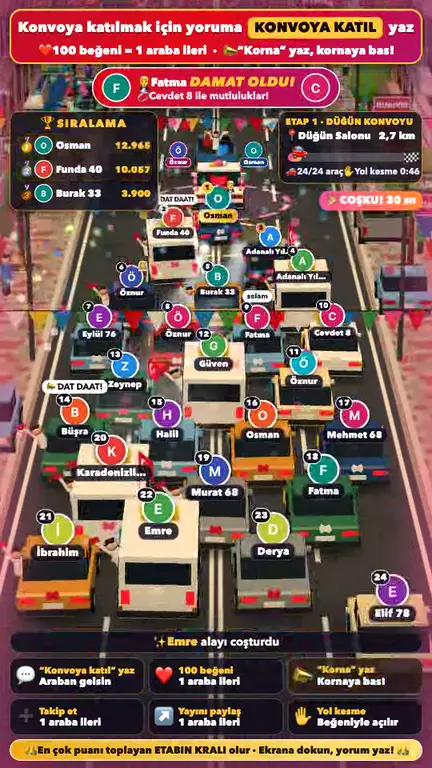
On your LIVE, every 100 likes from a viewer move their car up one place.
Try Wedding Halay next. Trade your car for a place in the dance.
Weddings, tea houses, football stands and bus stops. Choose a game, check its join phrase and try it in your browser.
A viewer types “konvoya katıl” and a car bearing their name joins the back of the convoy. Likes let it overtake.
Type “çay” to sit at a tea house table. A waiter carries the glasses. Likes refill the teapot and move viewers closer to the stove.
Type a team name to join its stand. Likes build chants and pressure, pushing the ball towards the goal of the weakest side.
Type “binecek var” to board the minibus. Take a seat, stand or queue at the stop. Likes accelerate the dolmuş as it races another minibus.
The handkerchief belongs to whoever leads.
Type “halaya gir” to join the wedding dance. Name a city to join its regional team. Likes move dancers forward towards the leader’s handkerchief.
Use these Turkish phrases to join, even on the English page.
Gift effects in the game
| Gift | On-screen effect |
|---|---|
| Rose | Moves the dancer forward, or extends the leader’s hold on the handkerchief. |
| Hat | The viewer leads the dance and keeps the handkerchief for 30 seconds. |
To use a game on your LIVE, run a small program on your computer. It passes comments, likes and gifts to the game.
Get the game package described in the setup guide. Follow its steps to install the program that connects the game to your LIVE.
Enter your TikTok username. Your password is not requested. Add the connection key as described in the guide.
Start your TikTok LIVE, then run the program on your computer. Once connected, open your chosen game in the browser.
Use window capture in TikTok LIVE Studio or OBS. Position the game window in your stream scene.
Useful answers before you choose your first game.
Each game has a join phrase. Viewers type it in your TikTok comments to take a place in the game, such as a car, cushion or stadium seat. Likes move play along.
Yes. You can try the games in your browser for free, without an account. Plans and prices for LIVE use have not been announced yet.
You need a computer, a current browser, TikTok LIVE access and TikTok LIVE Studio or OBS. The game program requires Node.js 20.12 or later. The guide also covers an Euler Stream connection key; connections without one may frequently be rejected. The steps are in the setup guide.
No. You enter your TikTok username. The program does not ask for your TikTok password.
Viewers stay in your TikTok LIVE. They type the game’s join phrase in the comments and use TikTok’s like action.
Yes. Viewers join with comments and contribute through likes. Each game’s details explain what likes do.
The 2D version uses lighter graphics. In 3D, guests walk in, the camera follows events and the room expands as it fills. Try both on your streaming computer.
Use the Turkish phrases shown beside each game. The English page translates the explanations, while the join commands stay the same.
Finished with the convoy? Try Tea House, Wedding Halay or another game that catches your eye.
Choose a game


